Torque · a Premiere Pro plugin by Geel Media

One panel. The whole edit.

Torque turns raw multicam footage into a finished episode, complete with captioned short-form clips - without ever leaving your Premiere timeline.

Watch the full demo
Multicam
Captions
Silences
Sorter
Clips
Ease

One panel, every step - multicam, clips, captions, silence, sorting, easing. No uploads, no round-trips. It all runs inside Premiere.

Adobe Premiere Pro 2025-2026/macOS · Apple Silicon/Intel & Windows coming soon
The problem

Every multicam edit needs the same five jobs.

01Cut between cameras02Find the clips03Resize to vertical04Remove the dead air05Add captions

Torque does that all for you, in project, with full editorial control.
See what's inside the panel:

Plus the small stuff that adds up - built right into the same panel.
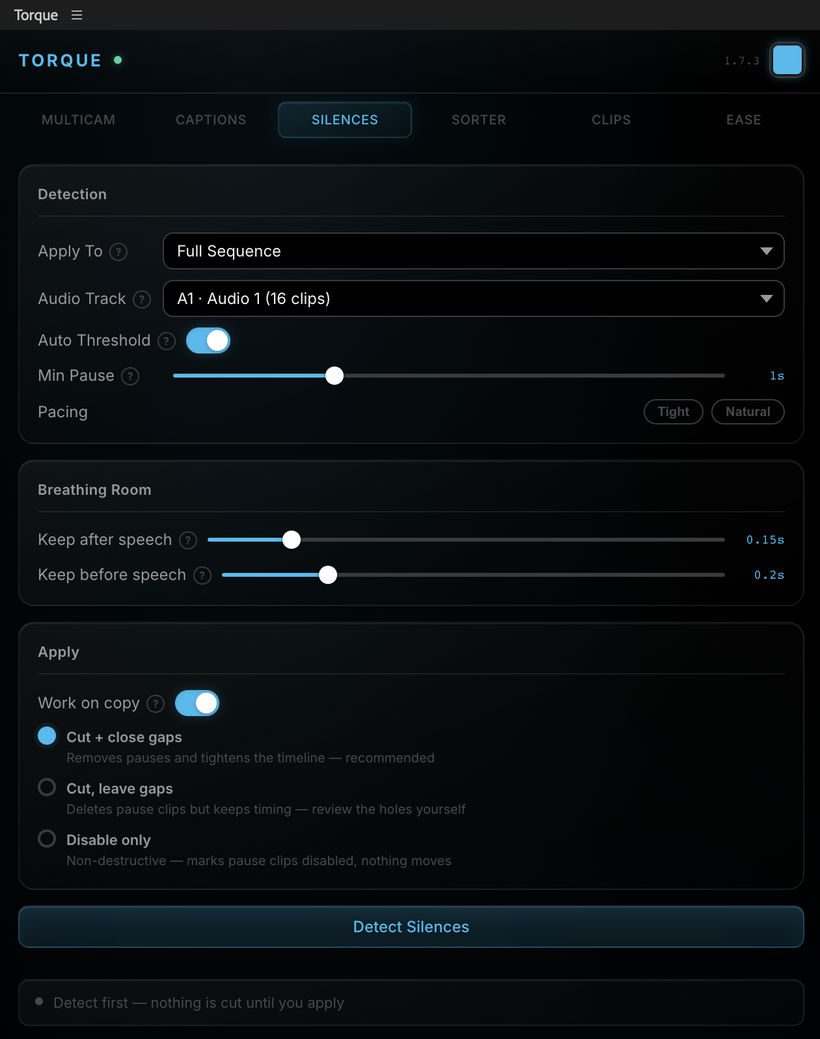
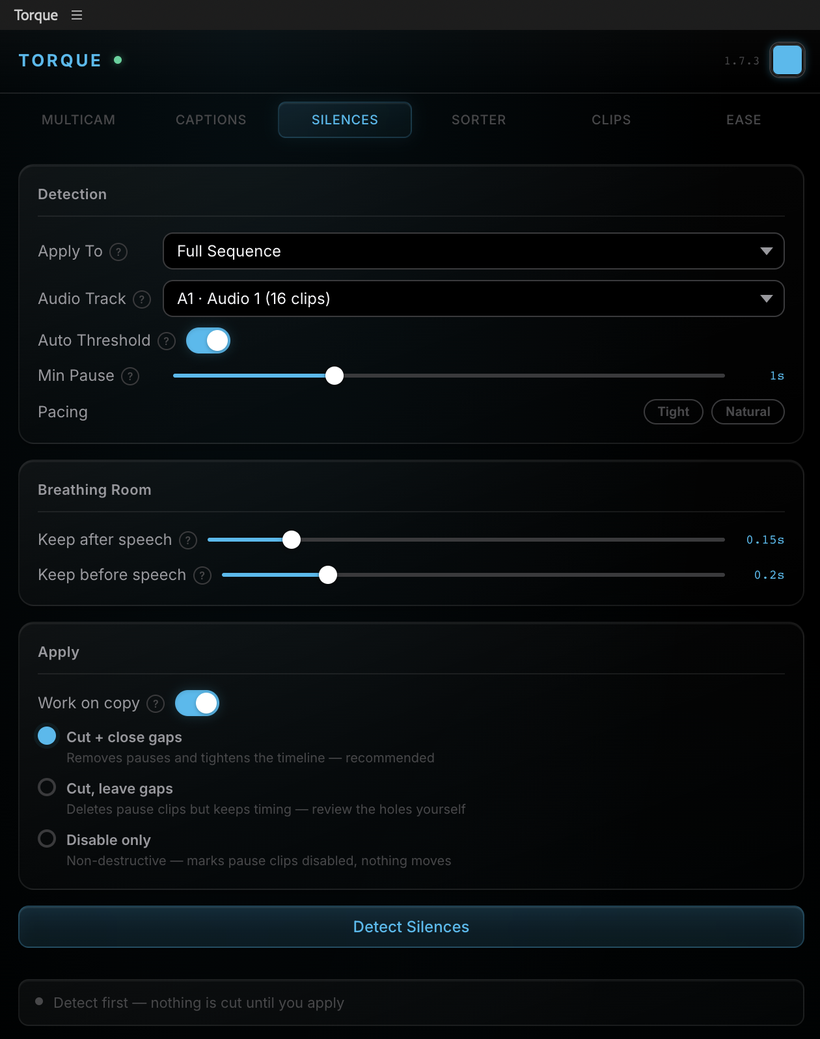
Silence Removal panel

Silence Removal

Detect and cut dead air in one pass - keep the breaths that sound human, drop the ones that don't.
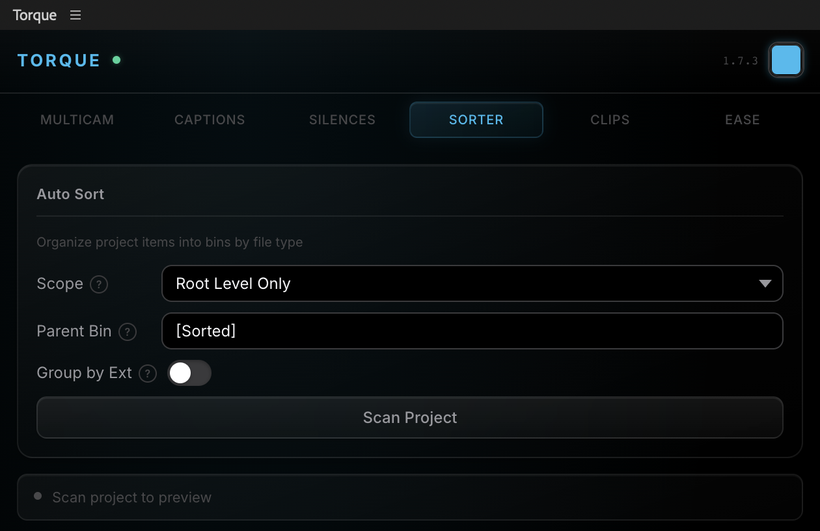
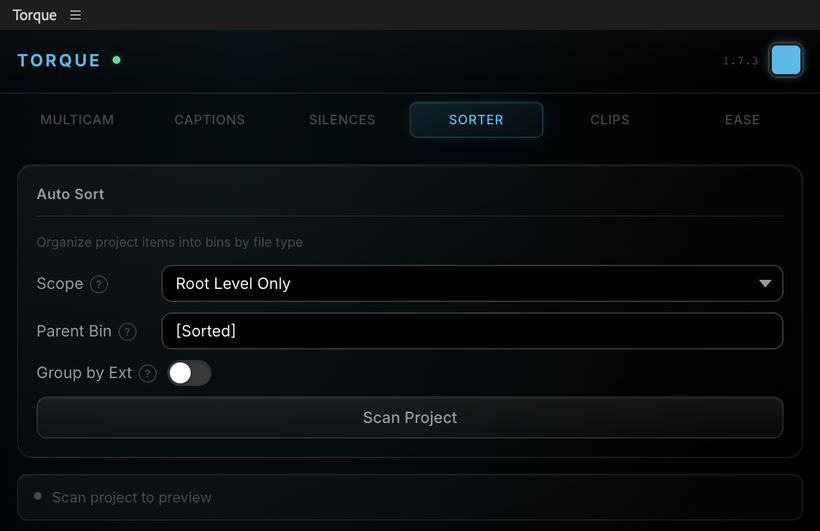
Project Sorter panel

Project Sorter

Auto-organizes your project items into bins by file type, so the project stays clean.
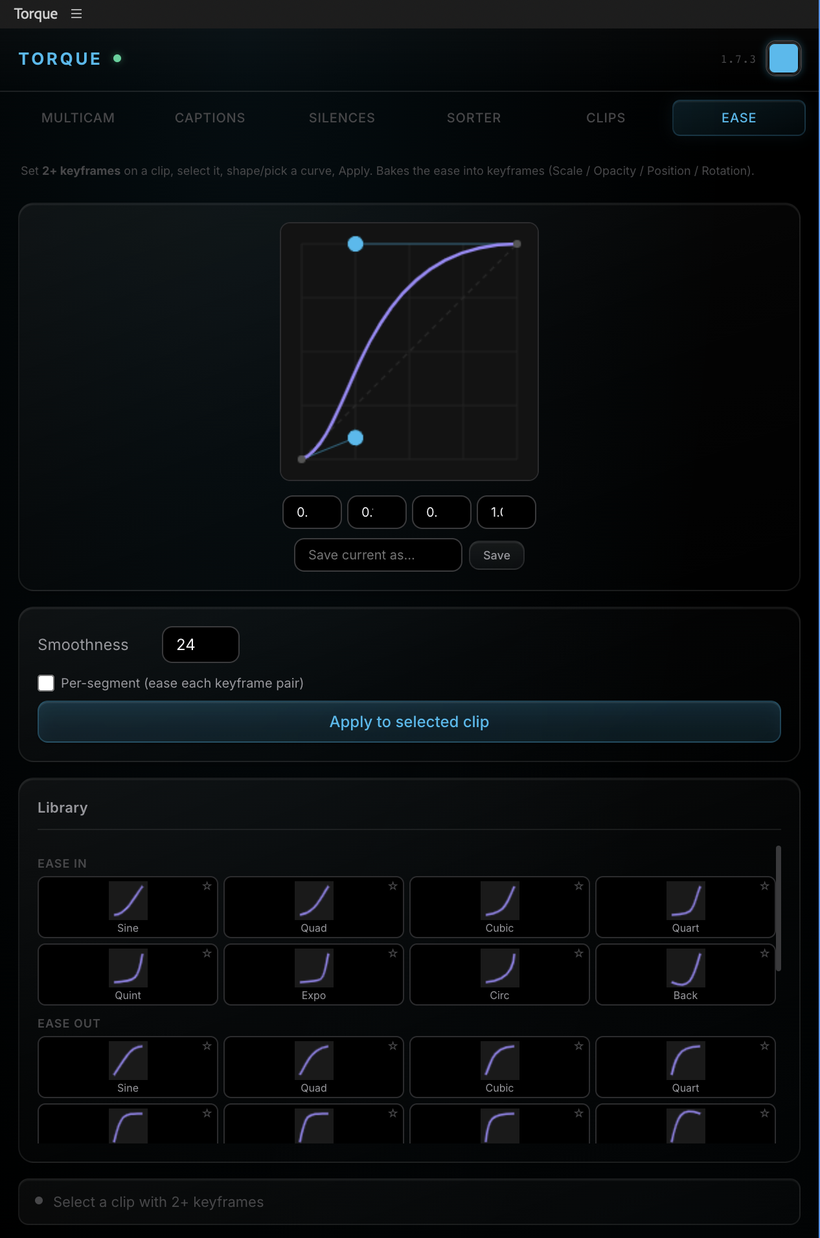
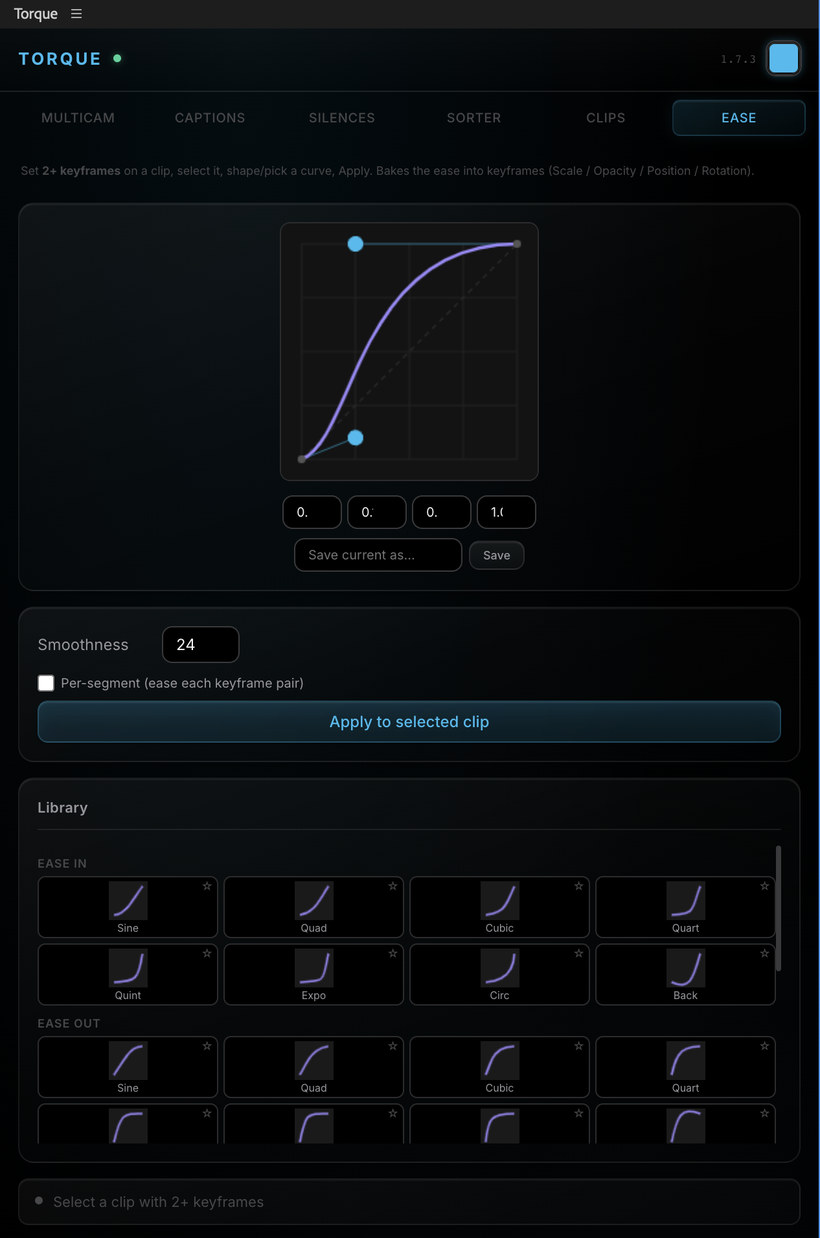
Keyframe Ease panel

Keyframe Ease

Save your favorite easing curves and drop them onto any keyframes in a click.

The honest comparison

Torque = more, for less.

AutoPod does the editing. Opus Clip does the clips - on a website. Torque does both, inside Premiere, and you can own it outright.

CapabilityTorqueAutoPodOpus Clip
Multicam auto-editYesYesNo
Silence removalYesYesNo
Kinetic captions in PremiereYesNoNo
AI finds the clipsYesReformat onlyYes
Works inside PremiereYesYesWeb only
Own it outrightYes · $199NoNo
Monthly price$19$29from $15
Pricing

Freedom to rent or own your tools.

We were sick of renting our tools - so we made one you can own.

Monthly
$19/mo
billed monthly
  • Full panel · 2 seats
  • Every update
  • 50 AI clip-finds / month
Start 30-day trial
Best valueYearly
$139/yr
≈ $12/mo · save ~$90
  • Full panel · 2 seats
  • Every update
  • 50 AI clip-finds / month
Start 30-day trial
Launch onlyLifetime
$199 once
own it - no subscription
  • Full panel · 2 seats
  • Lifetime updates
  • 20 AI clip-finds / month
Buy Lifetime
Need more seats?
Studio licensing for teams & agencies - more seats, pooled AI, priority support.
Contact us

Download and license keys will be delivered to your email upon payment confirmation.

Subscriptions start with a 30-day free trial - cancel anytime before it renews.
Prefer to own it? Lifetime comes with a 14-day money-back guarantee.

Questions

The honest answers.

How do I buy, download, and activate Torque?

The whole thing takes about two minutes:

  1. Buy - pick a plan and check out (card or PayPal) right here on the page. Nothing to configure.
  2. Get your files - the moment payment confirms, you get an email (and an on-screen confirmation) with your download link and license key.
  3. Install - run the downloaded installer. It's signed and notarized by Apple, so it installs like any normal Mac app - no security warnings, no developer setup.
  4. Open the panel - in Premiere, go to Window → Extensions → Torque.
  5. Activate - paste your license key into the panel and you're in. Your license covers two machines, and the editing tools run fully offline.

Lost your key or download link? Email media@greggeel.com and we'll resend it.

Will this work with my setup?

If each speaker has their own audio track, yes - RØDEcaster, Riverside, Zoom, lavs, booms, any camera-and-mic setup with isolated stems. Torque reads those mics to build the cut, so it works with whatever gear you already run.

Do the clips look AI-generated?

No. These are real cuts on your real footage - Torque finds the moments and builds the sequences, then you finish the edit in Premiere with full control. Nothing is synthesized; it's your video, just faster to assemble.

Is my footage uploaded anywhere?

No. Your video and audio never leave your machine. The only thing that touches the cloud is the transcript text of an episode, and only when you run the AI Clip Finder. Multicam, captions, and silence removal are fully local and work offline.

What if it doesn't fit my workflow?

Subscriptions come with a 30-day free trial - cancel anytime before it renews. Lifetime has a 14-day money-back guarantee. Either way, you can back out.

Subscription or Lifetime - which should I get?

Get Lifetime to own it outright (one payment, yours forever, 20 AI finds a month). Get Monthly or Yearly if you'd rather pay as you go or want more AI volume (50 finds a month). Same full panel on every plan.

How does the AI clip limit work?

The editor is unlimited - multicam, captions, and silence run on your machine, forever, offline. The AI Clip Finder is the one metered part, measured in "finds": one find analyzes a full episode and hands back a whole batch of clips (up to 40, 15 by default). It's one find no matter how many clips come back. Monthly and Yearly include 50 finds a month; Lifetime includes 20 - they reset monthly and don't roll over.

What do I need to run it?

Premiere Pro 2025 or 2026 on a Mac with Apple Silicon (M1 or newer). Intel Macs and Windows are on the way. The installer is signed and notarized - it installs like any normal Mac app, no developer setup.

Built by an editor · for editors

Stop cutting multicam by hand.

Try the whole panel free for 30 days. Watch a full episode cut in the time it takes to make coffee.

Start your free trial ▶ Watch the full demo

30-day free trial · cancel anytime · Premiere Pro 2025-2026 · macOS